Tutorials
Walkthroughs for the parts of the software that reward a bit of explanation.
Read the tutorialsHelp centre
Have a look here before checking with the community or reporting a bug. These are the same articles the game shows in its own Help dialog.
From the Main menu you can access the settings dialog. Graphics quality is on the System tab.
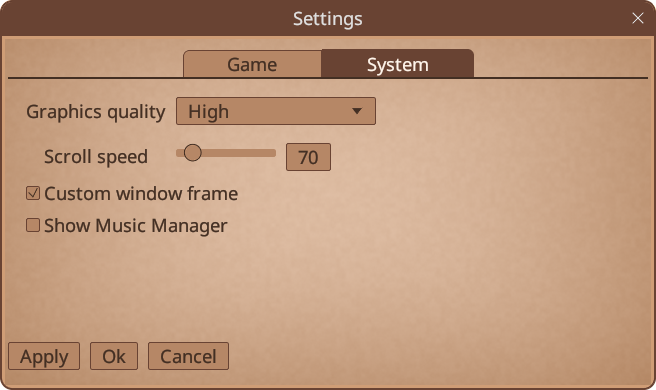
Choose a lower graphics quality. These are designed to accommodate laptops and reduce power consumption.
This only applies to the Steam version of TickWords.
Steam Cloud keeps your play progress, game statistics, word database and your own crossword files in step across your computers.
Steam settles any difference between computers before the game starts. If a sync ever takes your data the wrong way, nothing is lost: whenever a cloud copy replaces a local file, the game first keeps the old file beside it with “replaced-by-cloud” added to the name.
To restore one:
%LOCALAPPDATA%\tickwords on Windows, ~/.local/share/tickwords on Linux.user_db.json.replaced-by-cloud. Move the current user_db.json somewhere safe, then rename the backup to user_db.json.The synced files are:
user_db.json is your word database (clues, tags, books and collections).game_results.sav is your game statistics.saves/default/save_game_latest.sav is your play progress. This folder also holds a dated backup for each day you played.crosswords and imported_crosswords folders hold your own crossword files, synced one by one.Deleting a crossword sends it to the system recycle bin, on that computer and, as the sync catches up, on your other computers too. A mistake can normally be undone via the recycle bin.
If you would rather keep saves on one computer only, right click TickWords in your Steam library, then Properties, General, and un-tick Steam Cloud.
Scroll speed can be adjusted on the System tab of the settings dialog.
Note: If you’re using Steam, and you have moved your settings between a Windows machine, and a Mac/Linux one, this setting will need adjustment.
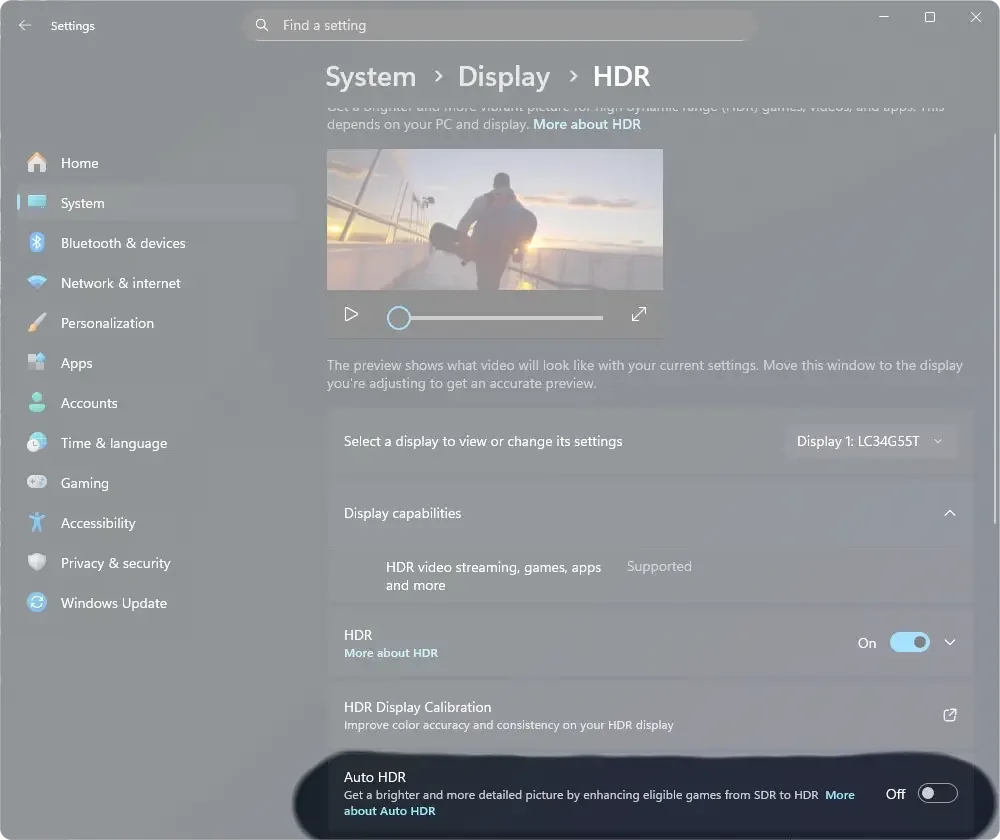
This only applies to HDR monitors.
If you encounter weird colours while using the software, often triggered by entering fullscreen mode, this is usually an issue between Windows Auto HDR and our rendering pipeline.
To fix this you can disable Auto HDR, or add TickWords to the exclusion list in the HDR settings.
Still stuck
Walkthroughs for the parts of the software that reward a bit of explanation.
Read the tutorialsAsk the community, or catch us there. It is the fastest way to get an answer.
Join DiscordFound an issue? Tell us what happened and we will get it fixed.
Report a bug